Donation Receipt Software for US Nonprofits
If you run a small 501(c)(3), year-end should not mean rebuilding donation acknowledgment letters from a spreadsheet. NonprofitStream is donor CRM and donation receipt software for small US nonprofits: you record each gift once, donors get a thank-you email right away, and at year end you issue one annual tax receipt PDF per donor.
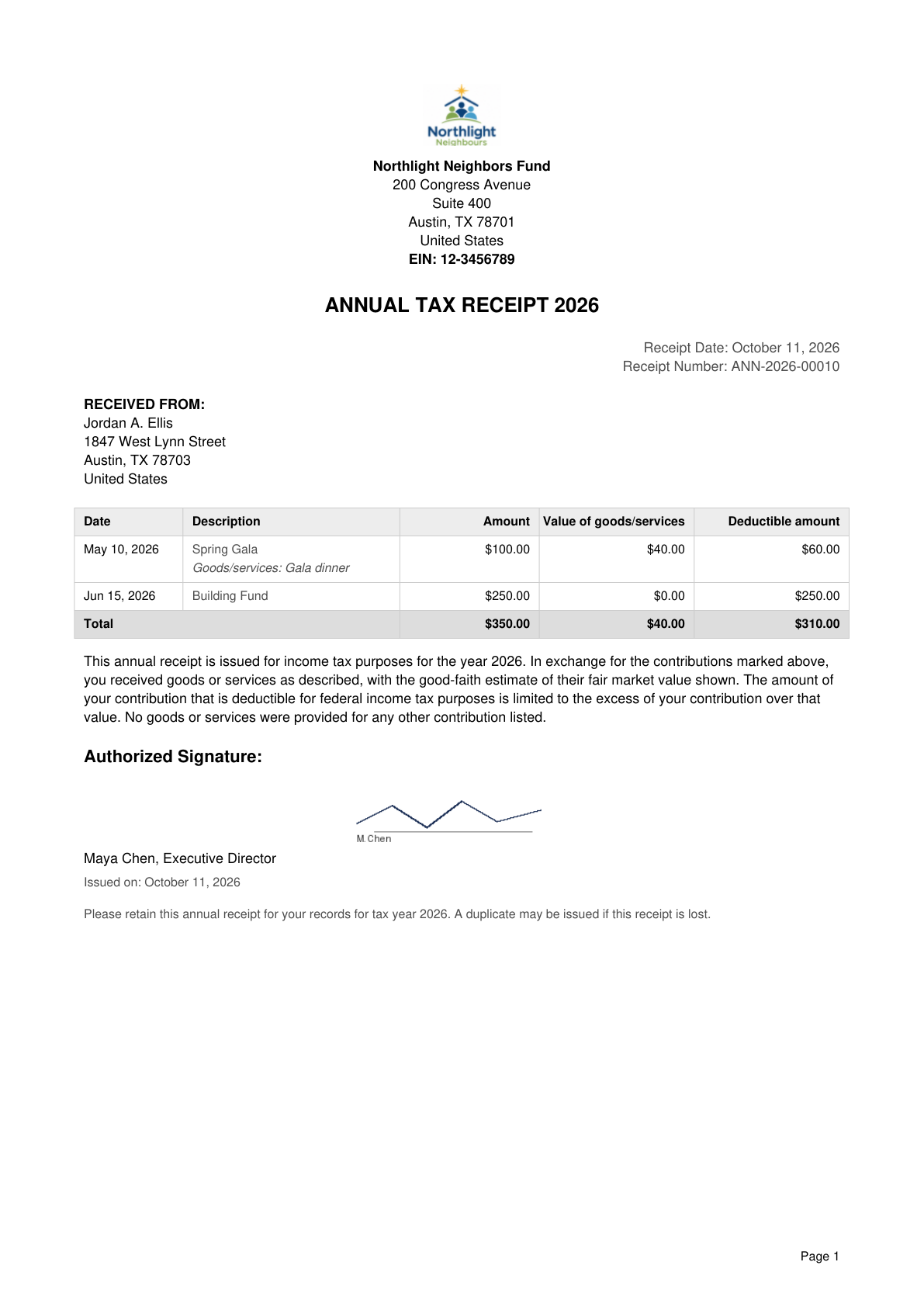
That PDF lists each contribution and, when a donor received something in return — a gala dinner, auction item, or event ticket — it can show the value of goods or services and the deductible amount with disclosure wording based on IRS requirements.
Free 14-day trial • No credit card required • Plans from $29 USD/month
What IRS donation acknowledgments must include
Donors need a written acknowledgment for any single contribution of $250 or more. The acknowledgment must include:
- The name of your organization
- The amount of a cash contribution (or a description of a non-cash contribution, without stating its value)
- One of these statements: that no goods or services were provided in return, or a description and good-faith estimate of the value of goods or services provided, or that only intangible religious benefits were provided
For a payment over $75 that is partly a gift and partly for goods or services (for example a gala ticket), the charity must tell the donor that the deductible amount is limited to the amount above the value received, and give a good-faith estimate of that value.
Sources:
Charitable Contributions — Written Acknowledgments (IRS)
Charitable Contributions — Quid Pro Quo Contributions (IRS)
How NonprofitStream creates year-end receipts
NonprofitStream keeps every gift linked to the right donor. When you mark a gift for tax receipting, it can be included in that donor's annual receipt for the year.
1. Set up your organization
Enter your legal name, address, and EIN, and upload an authorized signature in Organization Profile.
2. Record gifts
Log donations as they arrive: checks, card payments, cash, and so on. Optionally tag a campaign. Enter a fair market value and description when the donor received goods or services.
3. Issue year-end receipts
Generate an annual tax receipt PDF for each donor. The PDF can be emailed with the attachment.
Each gift can trigger a thank-you email (“Thank You for Your Donation”). That email is appreciation — not the official year-end tax PDF. Official acknowledgments are annual: one PDF covering the year's included contributions.
Gala tickets, dinners and auction items
When a donor receives something in return, your staff enter its fair market value and a short description on the donation. If any gift on the receipt has a value greater than zero, the year-end PDF switches to a five-column layout:
| Date | Description | Amount | Value of goods/services | Deductible amount |
|---|---|---|---|---|
| May 10 | Spring Gala (Goods/services: Gala dinner) | $100.00 | $40.00 | $60.00 |
| Jun 15 | Building Fund | $250.00 | $0.00 | $250.00 |
| Total | $350.00 | $40.00 | $310.00 |
The receipt also includes disclosure wording: the donor received goods or services as described, with your good-faith estimate of fair market value shown, and that the deductible amount is limited to the excess of the contribution over that value. Gifts with nothing in return are covered too. If no gift on the receipt has a value entered, the receipt states that no goods or services were provided. On a mixed receipt, it states that no goods or services were provided for the other gifts listed.
NonprofitStream does not invent the value for you — your organization enters the estimate.
What the US annual PDF includes
- Organization name and address from your Organization Profile
- EIN (from your charity registration number field)
- Title: “ANNUAL TAX RECEIPT {year}”
- Receipt date and receipt number
- Donor name and address
- Each included gift: date, description, and amount
- When any gift has goods/services value: columns for Value of goods/services and Deductible amount, with “Goods/services: …” under the description, plus a Total row
- Legal statement: either “No goods or services were provided in exchange for these contributions,” or the goods/services disclosure when values are present
- Authorized signature block when a signature is on file
Pricing in USD
Annual donation acknowledgment PDFs are included in every plan.
| Plan | Price (USD/month) | Contacts | Emails per month |
|---|---|---|---|
| Starter Plan | $29 | 500 | 1,500 |
| Pro Plan | $39 | 1,000 | 3,000 |
| Advanced Plan | $69 | 2,500 | 10,000 |
Start with a 14-day free trial (no credit card required). Trial limits are 50 contacts and 50 emails. See pricing on the homepage for the full plan list.
If you also work with Canadian charities, see CRA tax receipts for the bilingual Canadian receipt layout.
Frequently asked questions
Start a free 14-day trial — no credit card required
Record a few gifts, preview an annual receipt, and see if this CRM fits your team.
Free 14-day trial • No credit card required • Cancel anytime
Your organization is responsible for entering accurate information and values. Consult your accountant for your specific situation.