Year-end donation receipts in minutes, not weeks.
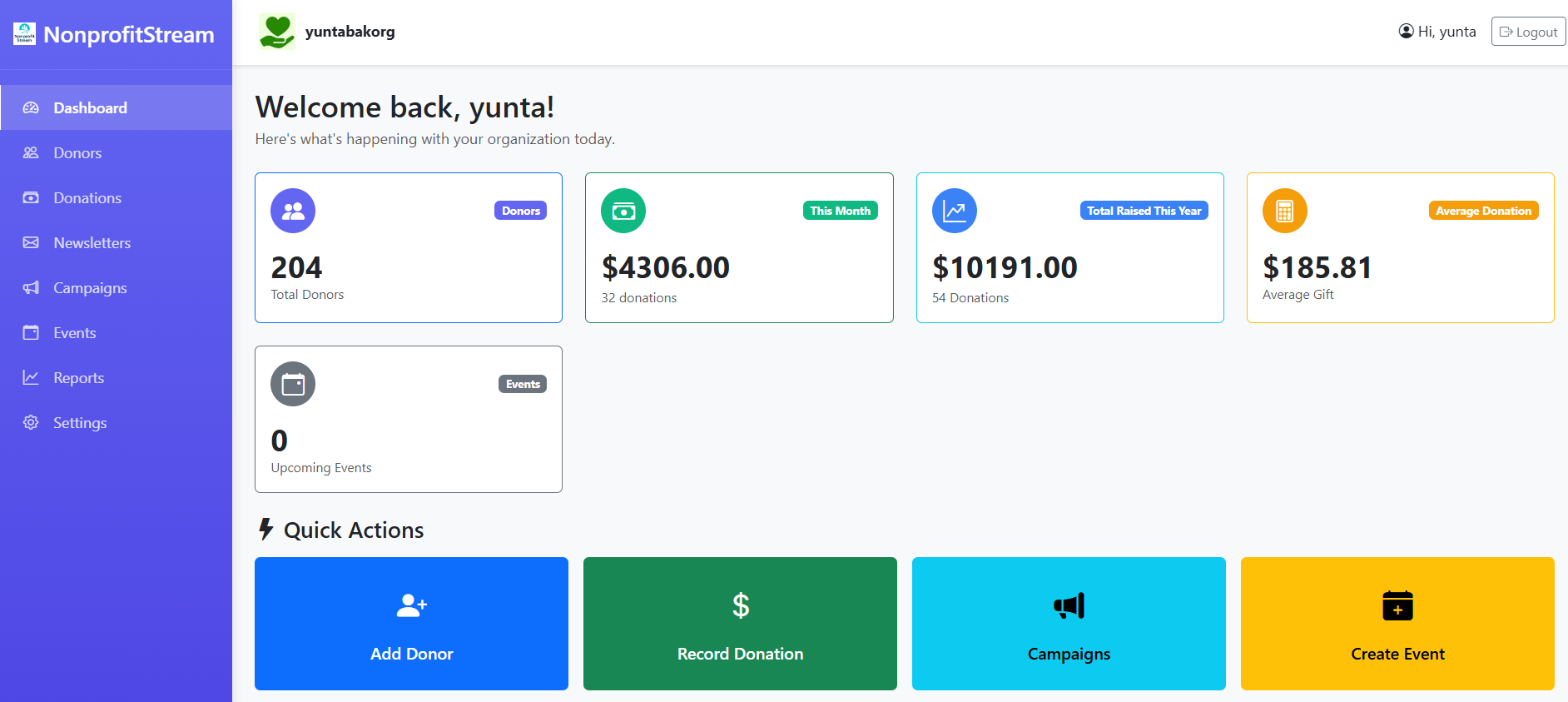
Don't spend January buried in spreadsheets. Keep every donor and gift in one place, and email each donor their year-end giving statement in a few clicks. Built for small charities and nonprofits.
- Year-end receipts for every donor, emailed in a few clicks
- Import your donor list from Excel (CSV) — record each gift in seconds
- Newsletters and campaigns included — no extra tools
14 days free · No credit card · Cancel anytime · From US$29/month
How it works in 3 steps
-
Add your donors — import your list from Excel (CSV) or type them in.
-
Record gifts as they come in — cash, check, bank transfer, card.
-
At year-end, email every donor their receipt in a few clicks.
14-Day Free Trial
Secure & Encrypted
IRS-ready receipts
Everything You Need to Grow Your Mission
Powerful tools designed specifically for small nonprofits
Donor Management
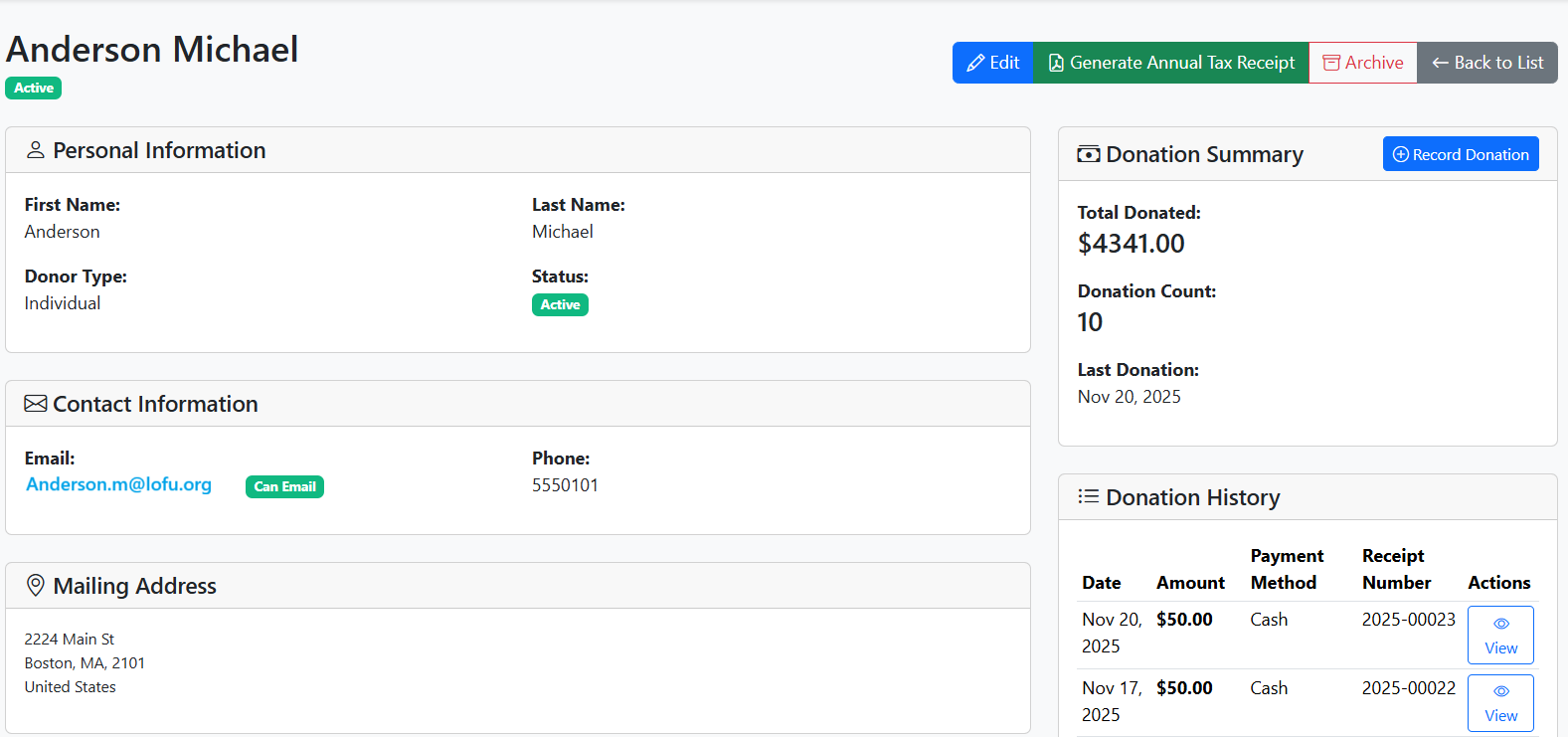
Build and maintain comprehensive donor profiles. Track contact information, donation history, and engagement.
- Complete donor database
- Donation history tracking
- Donor segmentation and filtering
- Generate tax receipts instantly
- Email donors directly
Donation Tracking
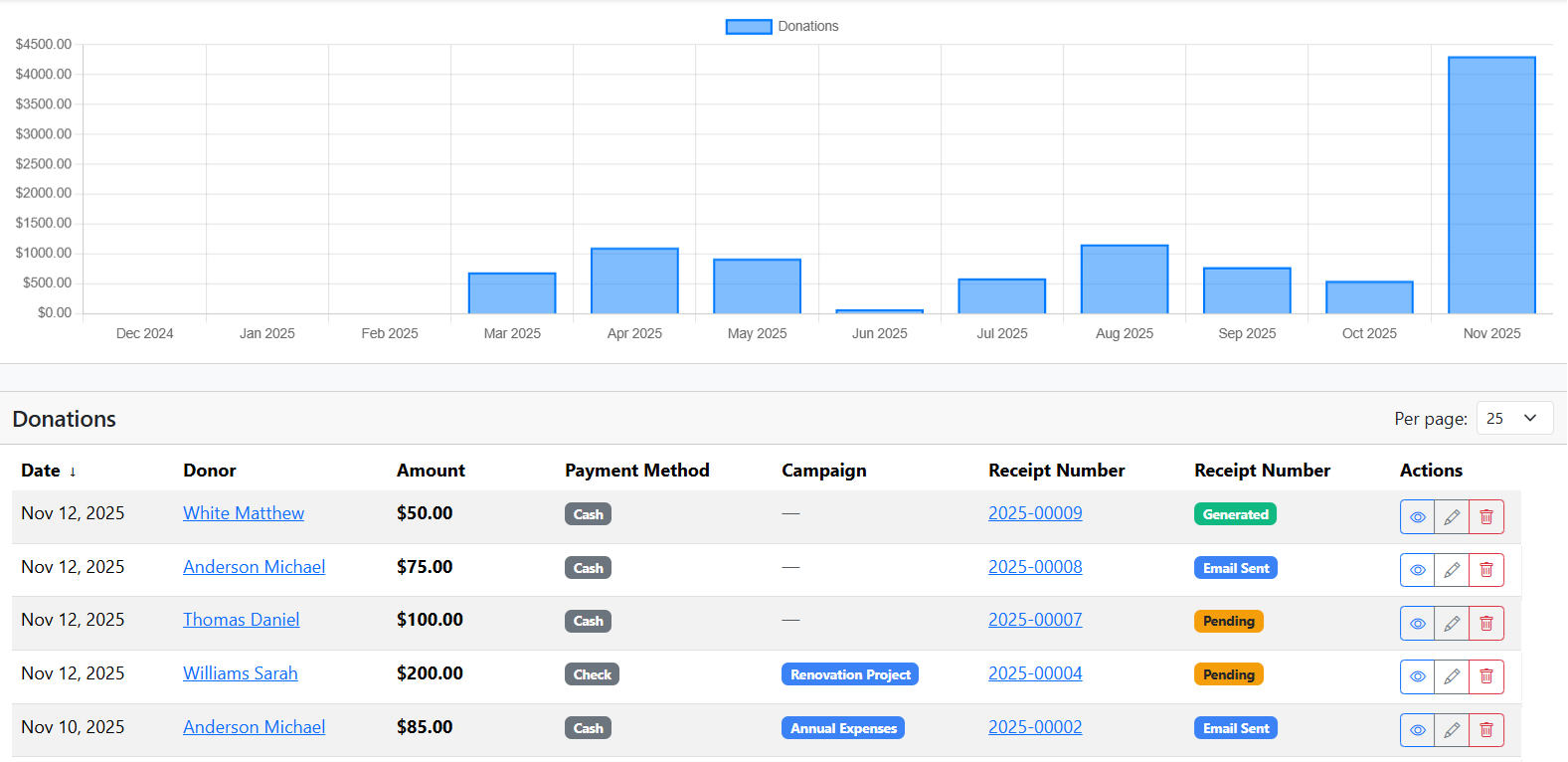
Record and manage all donations in one place. Track donations from any source with beautiful analytics.
- Record donations from any payment method
- Link donations to campaigns
- Visual trend charts
- Comprehensive donation reports
- Multiple payment methods (cash, check, card, transfer)
Campaign Tracking
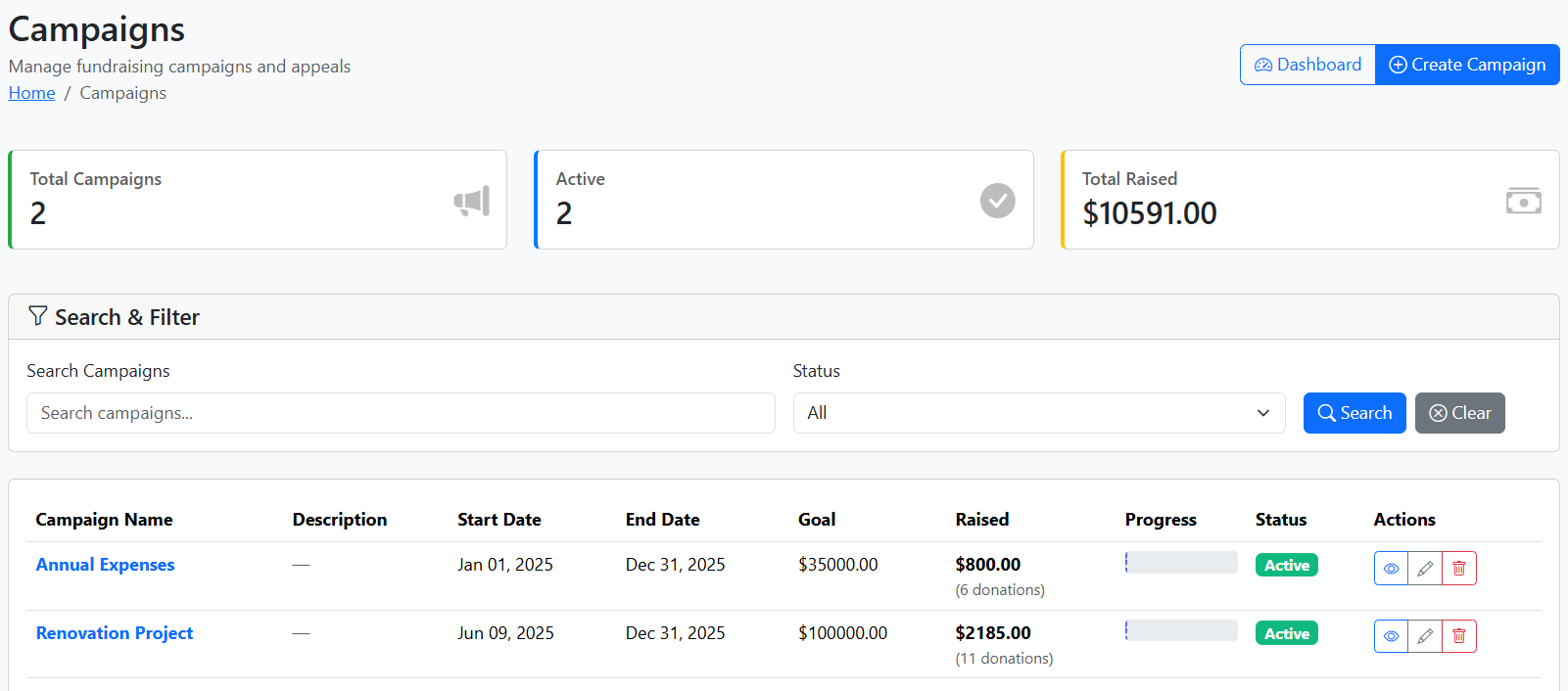
Monitor fundraising campaigns and measure their success. Allocate donations to campaigns and track progress.
- Campaign creation and management
- Link donations to campaigns
- Track goals vs. raised amounts
- Campaign performance metrics
- Campaign comparison reports
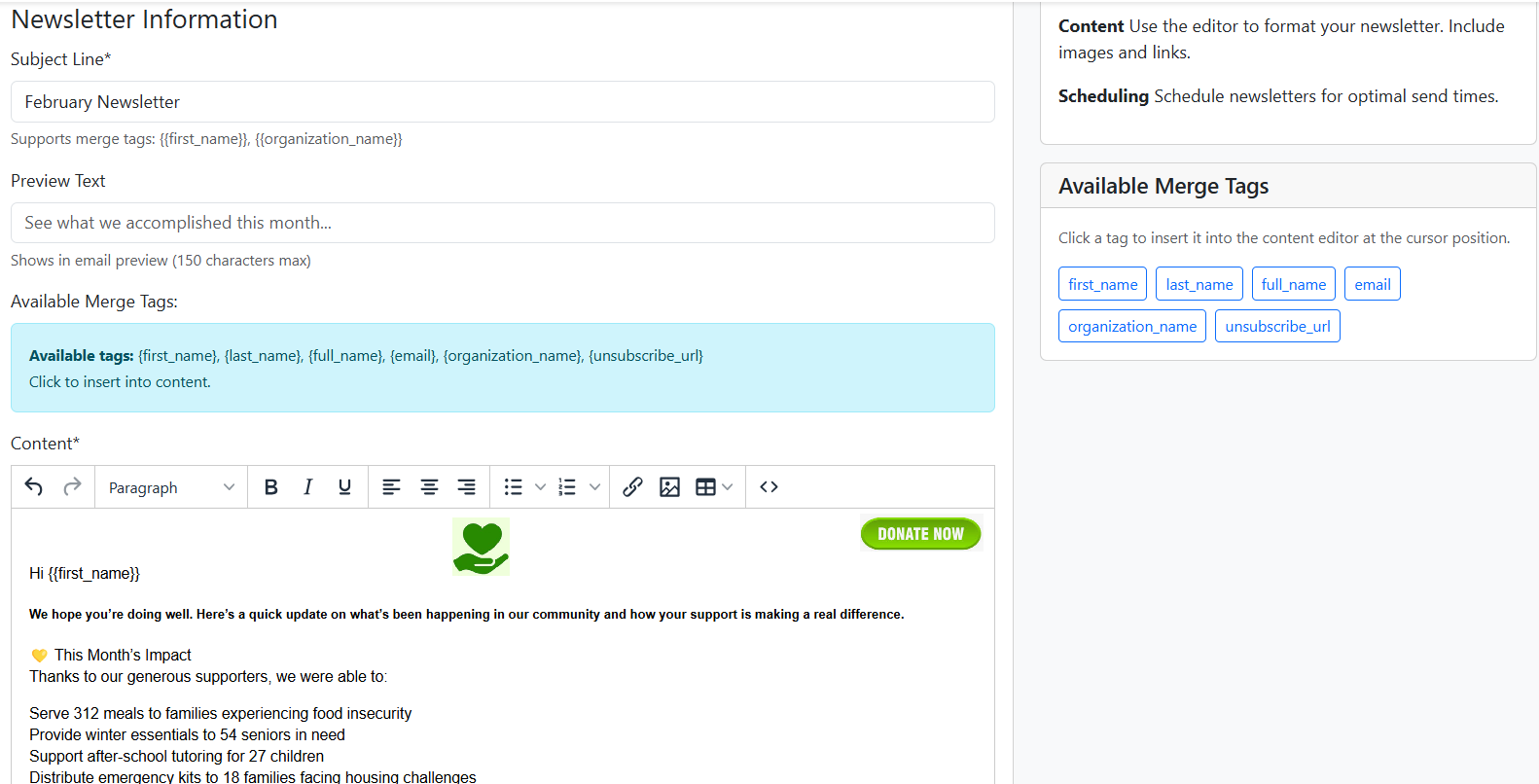
Email Newsletters
Send branded newsletters to keep your donors engaged and informed. Create professional emails with personalized content and your organization's logo.
- Rich text email formatting
- Personalized content with merge tags
- Organization branding and logo
- Schedule or send immediately
- Track email delivery status
Reports & Analytics
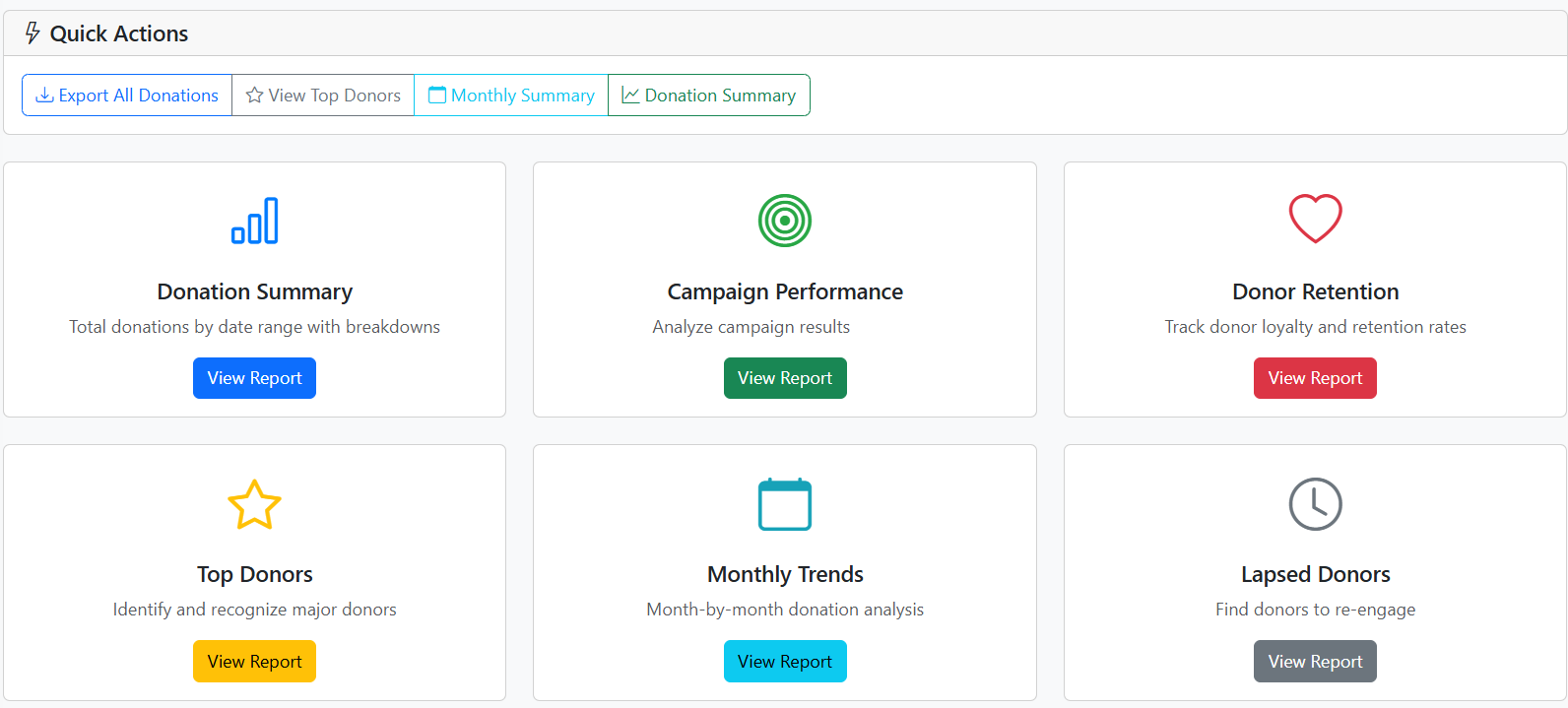
Analyze your fundraising performance with powerful reports. Get insights into donor behavior and campaign success.
- Donation summary reports
- Campaign performance analysis
- Donor retention tracking
- Top donors identification
- Monthly trends analysis
- Lapsed donor reports
IRS-ready donation receipts
Generate and email annual tax receipts to each donor's email address.
- Automatic PDF generation
- IRS-ready receipt formatting
- Annual tax receipt summaries
- Instant thank you email delivery
NonprofitStream is a product of Automaticlick Inc. · Export your data anytime · Cancel anytime
Built for Nonprofits, Priced for Reality
Choose the plan that fits your needs
Prices shown in USD
Starter Plan
14-day free trial included
- 500 contacts
- Donor database & profiles
- Donation tracking
- Monthly Newsletter
- Automated Tax Receipt Generation
- Annual consolidated tax receipt (IRS-ready)
- Event management & registration
- Campaign Management
- Reports & analytics
- 1.5K Email Quota
Pro Plan
14-day free trial included
- 1,000 contacts
- Donor database & profiles
- Donation tracking
- Monthly Newsletter
- Automated Tax Receipt Generation
- Annual consolidated tax receipt (IRS-ready)
- Event management & registration
- Campaign Management
- Reports & analytics
- 3K Email Quota
Advanced Plan
14-day free trial included
- 2,500 contacts
- Donor database & profiles
- Donation tracking
- Monthly Newsletter
- Automated Tax Receipt Generation
- Annual consolidated tax receipt (IRS-ready)
- Event management & registration
- Campaign Management
- Reports & analytics
- 10K Email Quota
All plans include 14-day free trial. Cancel anytime.
Prices plus applicable taxes.
Software for every Nonprofit
From small community groups to growing charities
Charities & Foundations
Community charities and grant-making foundations
Religious Organizations
Places of worship and faith-based groups
Community Organizations
Grassroots organizations making local impact
Health & Education
Healthcare initiatives and educational programs
Built by People Who Understand Nonprofits
We've worked alongside nonprofits for years and have seen the challenges firsthand. Managing donors in spreadsheets. Spending hours on tax receipts. Juggling multiple tools that don't talk to each other. Watching budgets stretched thin on expensive software.
We knew there had to be a better way. Small nonprofits need powerful tools, but they don't need complexity or enterprise pricing. They need software that just works—built with their real needs in mind.
That's why we created NonprofitStream. A complete CRM designed specifically for small teams doing big work. Affordable, user-friendly, and focused on what matters: helping you spend less time on admin and more time on your mission.
Frequently Asked Questions
Everything you need to know
During your trial, you can add up to 50 contacts and send up to 50 emails to test the system. We'll send you a reminder email 3 days before your trial ends.
After your 14-day trial you have a 45-day grace period to subscribe. Until you subscribe, emails from NonprofitStream go only to your own address — your donors don't receive anything yet. After the grace period, subscribe to continue using the CRM (you can still export your data). When your access ends, you have 120 days to download your data. See the FAQ on data retention.
To subscribe: Go to Settings → Billing Settings → Subscribe Now.
• 500 donor contacts
• 1,500 emails per month
• Donations tracking and tax receipts
• Campaign tracking
• Event management
• Email newsletters
• Reporting & Analytics
• Email support
Pro Plan:
• 1,000 donor contacts
• 3,000 emails per month
• Everything in Starter, plus:
• Priority email support
• Phone Support
Advanced Plan:
• 2,500 donor contacts
• 10,000 emails per month
All plans include: IRS-ready donation receipts, secure data storage, regular backups, and SSL encryption.
No hidden fees.
Technical Security:
• 256-bit SSL encryption - All data transmitted over HTTPS
• Encrypted passwords - Industry-standard security
• PCI-compliant payments - Stripe handles all payment processing
• Backups - Automatic backups with recovery options
• Secure hosting - Enterprise-grade servers
Data Privacy:
• Your data is NEVER shared with third parties
• We don't sell or rent your information
• You own your data
We're serious about protecting your donors' information.
Upgrading (Starter → Pro, Pro → Advanced, Starter → Advanced):
• Takes effect immediately
• Pro-rated charge for remainder of billing cycle
• Starter → Pro: contact limit increases from 500 to 1,000, email limit from 1,500 to 3,000
• Pro → Advanced: contact limit increases from 1,000 to 2,500, email limit from 3,000 to 10,000
• Starter → Advanced: contact limit increases from 500 to 2,500, email limit from 1,500 to 10,000
Downgrading (Pro → Starter, Advanced → Pro, Advanced → Starter):
• Takes effect at end of current billing cycle
• Pro-rated credit applied to next bill
• Pro → Starter: contact limit decreases to 500, email limit to 1,500
• Advanced → Pro: contact limit decreases to 1,000, email limit to 3,000
• Advanced → Starter: contact limit decreases to 500, email limit to 1,500
• Note: If you have more contacts than the new plan allows, you cannot add new ones until you are under the limit
Currency: Currency is locked after your first payment (USD or CAD). Contact support if you need to change currency.
No penalties for switching plans - just pro-rated adjustments.
How cancellation works:
1. Go to Settings → Subscription → Cancel Plan
2. Your access continues until the end of your current billing period
3. No future charges will be made
4. After your subscription ends:
• Your account goes into read-only mode for the paid period that remains
• You can still view your data and export reports when access allows
• You cannot add new donations, donors, or send emails once access ends
5. Data retention after cancellation:
• When your access ends, you can sign in and download your data for 120 days
• After that, we may delete it at any time, and we permanently delete it no later than 12 months after your access ended
• Deleted data is removed from our backups within 30 days
• You can ask us to delete your data sooner by writing to support@nonprofitstream.com; we do this within 30 days unless the law requires us to keep it
• We keep NonprofitStream's own billing records (invoices and payments) for 7 years for accounting
Before you cancel: Contact support for a full data extract and save tax receipts.
CSV Import Tool:
• Go to Donors → Import Donors
• Download our CSV template
• Fill in your donor data
• Upload the CSV file
What you can import:
• Donor names
• Email addresses
• Phone numbers
• Mailing addresses
• Donor Segment (Individual / Organization)
Import Features:
• Automatic validation - Checks for errors before importing
• Duplicate detection - Won't create duplicate donors
Import Limits:
• Starter: Up to 500 donors
• Pro: Up to 1,000 donors
• Advanced: Up to 2,500 donors
Need help? Sample CSV template provided. Support team can assist.
You can import multiple times if needed.
Support Channels:
Email Support:
• support@nonprofitstream.com
• Starter Plan: Response within 24-48 business hours
• Pro Plan: Priority support - response within 12-24 hours
What we help with:
• Technical issues and bugs
• Feature questions and how-to
• Data import assistance
• Tax receipt questions
• Payment and billing issues
• Account setup and configuration
• Report generation and export
Response Time:
• Starter: 24-48 hours
• Pro: 12-24 hours
• Critical issues (site down): Within 4 hours
Real people, real support!
What's on the receipt:
• Organization's name, address, and EIN
• Statement that the organization is a 501(c)(3)
• Date and amount of contribution
• Statement about goods or services, when applicable
Receipt format:
• Professional PDF
• Printable and email-friendly
• Your organization's logo and branding
Your responsibility:
• Enter your correct EIN
• Confirm your organization's status
• Upload an authorized signature
• Review receipts before sending
Disclaimer: Receipts are designed around IRS acknowledgment requirements; every organization should confirm wording with their accountant or legal advisor. Tax rules can change.
Credit Cards:
• Visa
• Mastercard
• American Express
• Discover
Debit Cards:
• Visa Debit
• Mastercard Debit
Digital Wallets:
• Apple Pay
• Google Pay
How Payment Works:
1. Add your payment method during signup or in Settings
2. Automatic monthly billing on your subscription anniversary date
3. Receipts emailed automatically after each payment
4. Update anytime - change cards in Settings
5. Secure processing - we never store your full card details
Billing Currency:
• Currency is locked after first payment
• All future charges in that currency
Payment Security:
• PCI DSS Level 1 certified (Stripe)
• We never see your full card number
• 256-bit SSL encryption
• 3D Secure authentication when required
All payments are processed in USD or CAD only.
What this means:
• One primary user account included
• Additional users available on request (Max 2 extra user at no cost)
• No per-user fees
• Each user has their own login credentials
Security Features:
• Password security requirements enforced
• Secure access controls
Best Practices:
• Don't share passwords
• Contact support when staff leave to remove access
Note: User accounts refer to staff who log in to manage your nonprofit. This is different from your contact limit (500 for Starter, 1,000 for Pro, 2,500 for Advanced), which refers to donors in your database.
Ready to Streamline Your Nonprofit?
Do more good with less effort. Start your free trial today.
Free 14-day trial • No credit card required • Cancel anytime