CRA Tax Receipt Software for Canadian Charities
Issue year-end official donation receipts that meet CRA requirements in minutes, not days. NonprofitStream builds a bilingual, numbered, signed PDF receipt for each donor from the donations you've recorded, and emails it to them.
Free 14-day trial • No credit card required • Plans from $39 CAD/month
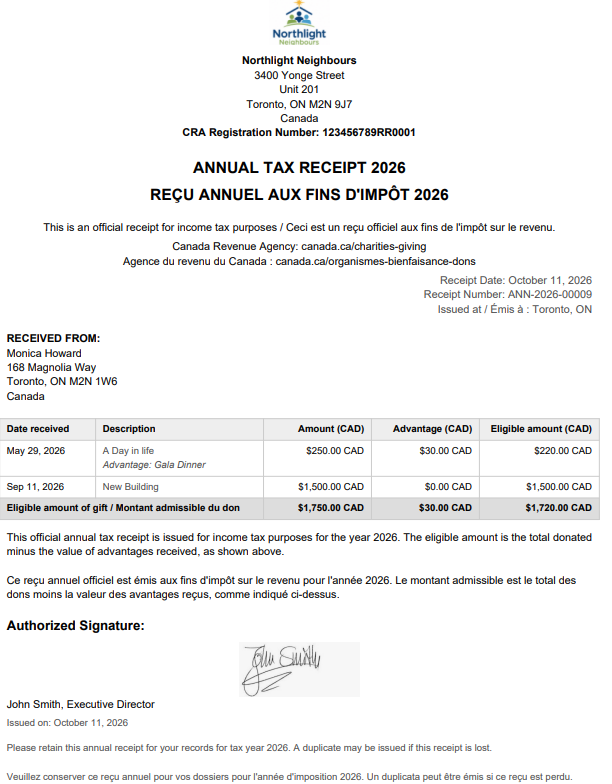
Year-end receipting shouldn't take a week
For many small charities, receipt season means exporting spreadsheets, merging letters, checking registration numbers by hand, printing, signing and mailing hundreds of envelopes. One typo can mean reissuing a receipt, and the CRA can penalize receipts that contain incorrect information.
NonprofitStream keeps every gift linked to the right donor, so your year-end receipts are built from the same records you already use, with the required details filled in every time.
What NonprofitStream includes on every receipt
The CRA sets out what an official donation receipt must contain. NonprofitStream builds each receipt from your organization profile and donation records, so these elements are included:
- A statement that it is an official receipt for income tax purposes
- Your charity's legal name and address, as on file with the CRA
- Your CRA registration number
- A unique serial number for every receipt
- The place where the receipt was issued
- The date each gift was received
- The date the receipt was issued
- The donor's full name, including middle initial, and address
- The amount of each gift
- The amount and description of any advantage the donor received
- The eligible amount of the gift
- The signature of an individual authorized by your charity
- The name and website address of the Canada Revenue Agency
You enter your organization's details once. Every receipt after that uses them automatically.
How it works
1. Set up your organization once
Add your legal name, address, CRA registration number, logo and authorized signature in Settings.
2. Record donations as they arrive
Log gifts by cash, cheque, card or bank transfer, and link them to donors and campaigns. Each donor gets an automatic thank-you email when their gift is recorded.
3. Issue annual receipts at year end
Generate one consolidated official receipt per donor, covering all of their eligible gifts for the year, and email it as a PDF. You can preview each receipt before issuing it.
4. Keep a complete record
Every receipt is stored against the donor's profile, so you can find it or send a duplicate copy any time.
Built for how small charities actually receipt
One annual receipt per donor
Each donor receives a single official receipt for the year, listing every eligible gift with its date and amount.
Bilingual by default
Every receipt is printed in English and French on the same page.
Unique serial numbers
Every receipt gets its own serial number automatically. Previews don't use up numbers.
Advantages handled correctly
If a donor received something in return, like an event meal, record its value and description. The receipt shows the gift amount, the advantage and the eligible amount. If an advantage is more than 80% of the gift, NonprofitStream warns you and leaves that gift off the receipt, as the CRA requires.
Corrections done properly
If a receipt needs correcting, the original is cancelled and a replacement is issued with a new serial number that states which receipt it replaces.
Lost receipts
Send a donor a duplicate copy, clearly marked as a duplicate, without issuing a new receipt.
Your logo and signature
Your logo and authorized signature appear on every receipt.
More than receipts
Receipting is one part of NonprofitStream. The same plan includes:
- Donor management: complete donor profiles and giving history
- Donation and campaign tracking: link gifts to campaigns and track progress toward goals
- Email newsletters: branded newsletters with your logo and a donate button
- Reports: donor retention, top donors, lapsed donors and monthly trends
Simple pricing in Canadian dollars
| Plan | Price | Contacts | Emails per month |
|---|---|---|---|
| Starter Plan | $39 CAD/month | 500 | 1,500 |
| Pro Plan | $49 CAD/month | 1,000 | 3,000 |
| Advanced Plan | $99 CAD/month | 2,500 | 10,000 |
CRA-compliant annual receipts are included in every plan. 14-day free trial, no credit card required, cancel anytime.
Frequently asked questions
Spend receipt season on your mission, not on paperwork
Join Canadian charities using NonprofitStream to issue accurate year-end receipts in minutes.
Free 14-day trial • No credit card required • Cancel anytime
Receipt requirements are set by the Canada Revenue Agency and can change. See the CRA's guidance on what must be on an official donation receipt . This page is general information, not tax or legal advice.